Environment Deployments
Overview
In the deployment environment overview you can see all deployments found from the gateway. The deployments for plans, applications and subscriptions are listed here.
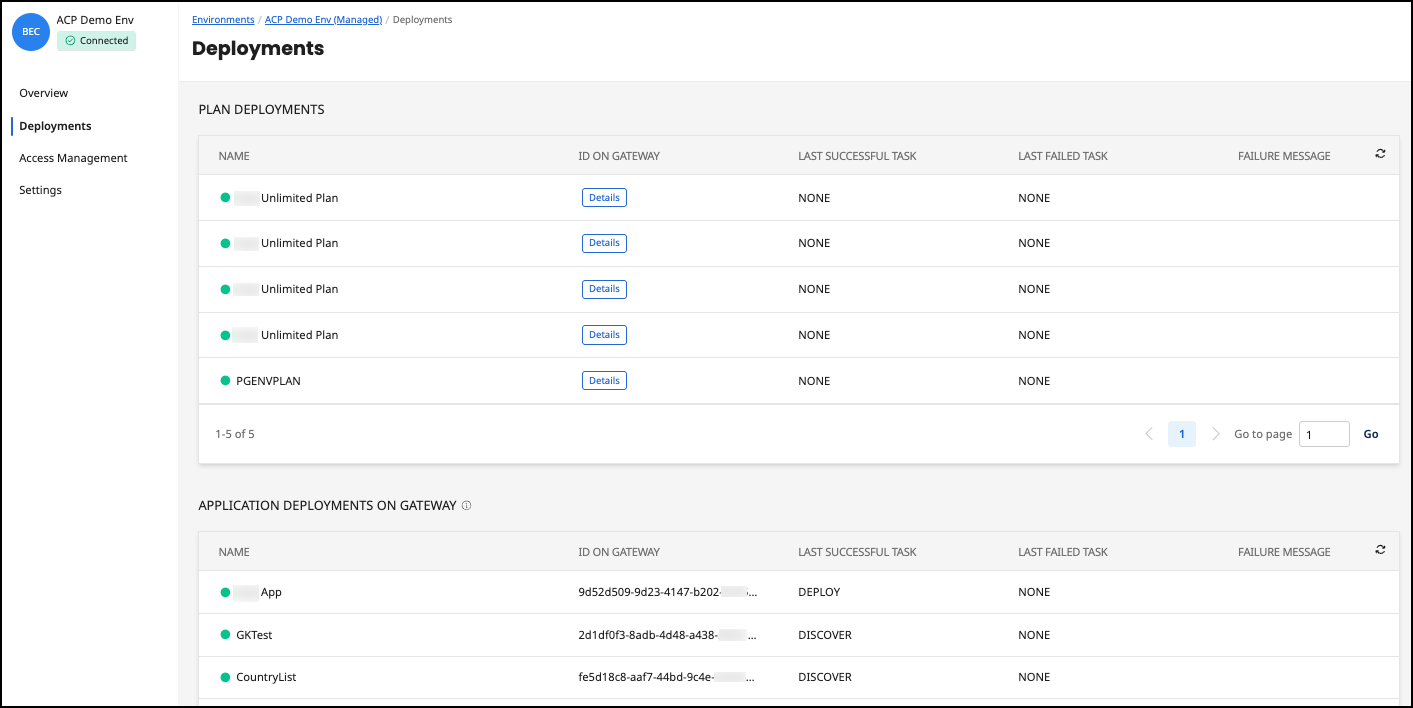
The Deployments section under a specific environment is dedicated to managing the deployment of API plans and applications. It provides a comprehensive view of all deployment activities within this environment.
Interface Structure
The interface is divided into two main sections:
-
Plan Deployments: Displays a list of API plans deployed within this environment.
-
Application Deployments on Gateway: Shows individual applications deployed under the API plans.
Plan Deployments
This list includes the following columns with deployment details:
-
Name: The name of the deployed API plan, which is indicative of the service provided (e.g., "Car finder plan - Plan Car Finder Plan 2").
-
ID on Gateway: A unique identifier for the API gateway where the plan is deployed.
-
Last Successful Task: Shows the last successful task performed in the deployment lifecycle. The DISCOVER task possibly indicates a stage in a continuous integration/continuous deployment (CI/CD) pipeline.
-
Last Failed Task: Indicates if there were any recent tasks related to the deployment that failed.
-
Failure Message: If there was a failure in the deployment process, the message or reason is displayed here.
Application Deployments on Gateway
Below the plan deployments, we have a similar structured table for application deployments on Gateway:
-
Name: The name of the application, which seems to follow a unique identifier format.
-
ID on Gateway: Corresponds to the API gateway identifier for the specific application deployment.
-
Last Successful Task: The last successful operation for the application deployment.
-
Last Failed Task: Documents any recent unsuccessful deployment tasks.
-
Failure Message: Provides details on the reason for any failures in deployment tasks.
